

How to pay with Bitcoin at GeeWiz
Here's how to pay with Bitcoin online at GeeWiz using a Lightning wallet or a crypto exchange wallet like Luno Pay, Binance Pay or VALR Pay.

You can pay with Bitcoin online at GeeWiz using one of two methods:
- Pay with Bitcoin Lightning.
- Pay using a crypto exchange wallet (Luno Pay, VALR Pay, or Binance Pay).
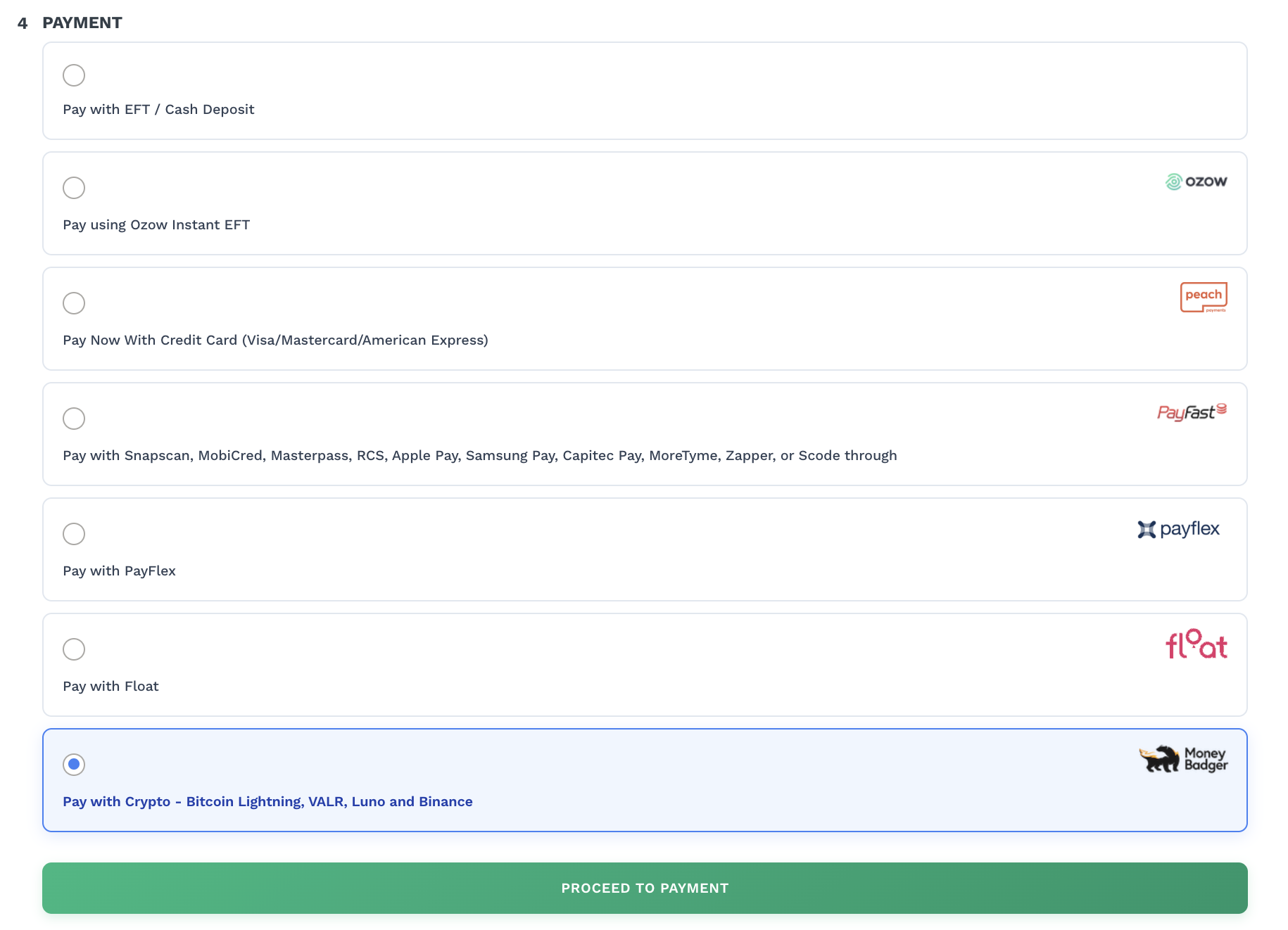
During checkout, choose Pay with Crypto as your payment method.
You’ll then be taken to the screen below, where you can select whether you want to pay with Lightning or your exchange wallet.
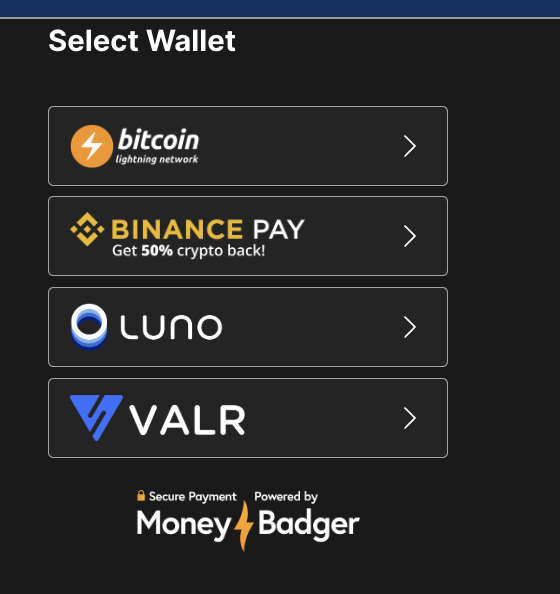
Let’s take a look at each option in more detail so you know exactly what to expect.
Option 1: Pay with Bitcoin Lightning at GeeWiz
How it works
When you choose Bitcoin Lightning at checkout, GeeWiz generates a Lightning-compatible QR code. You can complete the payment with any Lightning wallet by scanning the QR code on desktop or tapping “Open your Lightning wallet” on mobile to confirm in-app. Popular Lightning wallet options include:
How to pay
- Add items to the cart.
- Select Proceed to Checkout.
- Log in or create an account.
- Select Pay with Crypto under payment options.
- Choose Bitcoin Lightning.
- Pay with Bitcoin using your Lightning wallet:
- On mobile: tap Open your Lightning wallet and complete the payment in-app.
- On desktop: Scan the Lightning QR code with your wallet and confirm payment.
That’s it, your order will be confirmed immediately.
Option 2: Pay with Bitcoin at GeeWiz using a crypto exchange wallet
How it works
GeeWiz also supports Bitcoin payments through major exchange apps (Luno Pay, VALR Pay, or Binance Pay). After selecting your wallet at checkout, you can complete the payment by scanning the QR code on desktop or tapping the prompt to open your exchange app on mobile and confirming in-app.
The exact payment flow may vary slightly between exchanges.
How to pay
- Add your items to cart.
- Select Proceed to Checkout.
- Log in or create an account.
- Choose Pay with Crypto.
- Select Luno Pay, VALR Pay, or Binance Pay.
- Pay with Bitcoin using your exchange wallet:
- On mobile: tap the prompt to open your exchange app, select Bitcoin, and confirm the payment.
- On desktop: scan the QR code with your exchange apps built in scanner and complete payment.
Paying with Bitcoin at GeeWiz is easy
Whether you’re using a Lightning wallet or an exchange wallet, the process is simple:
Choose Pay with Crypto, select your preferred wallet (Lightning or exchange app), and confirm the payment. It’s fast, seamless, and works instantly across mobile and desktop.
If you want to learn how to spend your Bitcoin across more locations in South Africa, read our full spending guide: How to spend Bitcoin in South Africa (guide + real examples).
P.S. If you’d like to support my work, you can donate directly using the Bitcoin Lightning button below or send sats to nickdarlington@blink.sv from any Lightning wallet.

Stay updated on real-world Bitcoin adoption
Get the latest news, tips and updates on where to spend your Bitcoin and how to accept it at your business.

