
How to pay with Bitcoin in South Africa (complete guide + real examples)
Learn how to pay with Bitcoin in South Africa across hundreds of thousands of locations including Bootlegger, Pick n Pay, Clicks, and Engen.


Bitcoin is money in South Africa.
A few years ago, Pick n Pay made headlines as the first major retailer in Africa to accept Bitcoin payments. However, beyond the retail giant, only a handful of small, independent businesses were doing the same.
That’s changing.
South Africans can now pay with Bitcoin at hundreds of thousands of locations nationwide via MoneyBadger's partnerships with Zapper and Scan to Pay. That includes roughly 650,000 Scan to Pay merchants, like Clicks and Engen, as well as around 30,000 Zapper merchants, including Spur, Wimpy, and Yuppiechef.
What we’re seeing is a clear shift: People are no longer asking “Where can I spend my Bitcoin?” but rather “How can I spend it?”
Three ways to pay with Bitcoin in South Africa
There are three simple ways to pay with Bitcoin in South Africa:
- Crypto exchange wallets (Luno, VALR, or Binance Pay). These can scan SA QR codes directly using a built-in scanner at major merchants. Luno, VALR, and Binance Pay work at Bootlegger, Zapper, and Pick n Pay stores, and Luno and VALR work at Scan to Pay–enabled merchants.
- Directly with a Lightning wallet: All Lightning wallets can make Lightning payments, but currently only some (Blink, Blitz and Aqua) can scan South African retail QR codes directly. The rest need MoneyBadger as a bridge.
- Any Lightning wallet using MoneyBadger: If a wallet can’t scan a store’s QR code natively, you simply scan with MoneyBadger and complete the payment in your wallet.
How to pay with Bitcoin in four simple steps
Here's how you can get started:
- Download a Lightning wallet like Wallet of Satoshi, Phoenix, Aqua, and Blink.
- Download MoneyBadger: a QR code scanner you link to your Bitcoin wallet so you scan QR codes in SA and pay with Bitcoin.
- Get Bitcoin and fund your Lightning wallet.
- Scan QR codes at stores like Pick n Pay, Bootlegger, and Engen with MoneyBadger and complete payment in your Lightning wallet.
Step 1: Download a Bitcoin Lightning wallet
First, you’ll need a Lightning wallet: a wallet that makes instant, low-fee Bitcoin payments possible.
Why Lightning?
Bitcoin’s main network is built like a secure vault, which is excellent for saving and handling large transactions. However, it’s too slow and expensive for everyday purchases as transactions can take several minutes to confirm, and fees fluctuate depending on network congestion.
That’s where the Lightning Network comes in. It’s a layer built on top of Bitcoin that makes everyday payments instant and nearly free, so you can buy a coffee or fill up your tank without waiting minutes or paying high fees.
And a Lightning wallet is simply an app that connects you to that faster layer, turning Bitcoin from something you save into something you can actually spend.
Recommended Lightning wallets for paying with Bitcoin
Choose from these popular Bitcoin Lightning wallets:

Pro Tip: My personal favourite is Blink because it’s popular locally, easy to use, and packed with great features for both spending and accepting Bitcoin as a business, such as the static QR code and the web-based POS link.
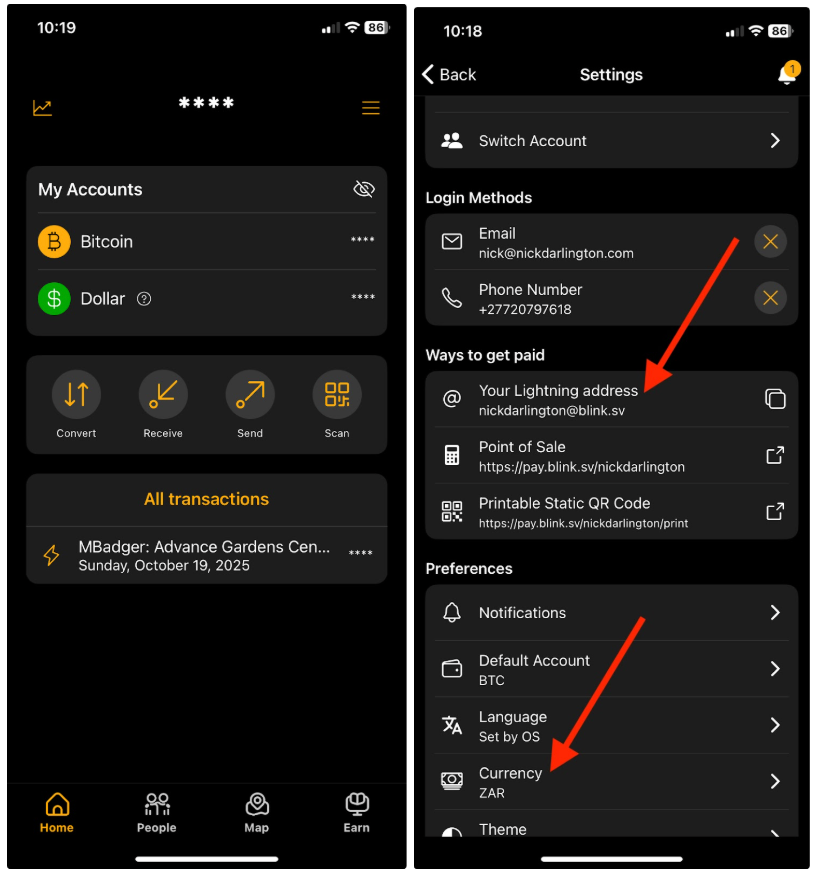
Example setting up Blink
After downloading it from the Google Play or App Store page, follow these steps:
- Open the app and tap the hamburger menu (top right),
- Select your Lightning address (e.g., you@blink.sv). You can’t change it later, so choose carefully. You can share this address with anyone who has a Lightning wallet, and they can send you Bitcoin.
- Set your preferred currency to rand.
Step 2: Download MoneyBadger
Once your Lightning wallet is set up, it’s time to connect it to South Africa’s payment rails. Enter MoneyBadger.
MoneyBadger is a simple QR code scanner app that connects to your Bitcoin wallet. It lets you scan almost any QR code in South Africa, like Zapper or Scan to Pay, and pay with Bitcoin.
It’s not a wallet that holds your Bitcoin. Instead, it acts as a bridge between your Bitcoin wallet and the store’s payment system, allowing you to pay in Bitcoin while the store decides whether to accept Bitcoin or rand.
How it works
When you scan a store’s QR code, MoneyBadger automatically reads it, converts the amount into Bitcoin, and opens your Lightning wallet so you can complete the payment.
You don’t store Bitcoin inside MoneyBadger as it’s just a bridge between your wallet and the merchant.
How to get started
- Download it from the App Store or Google Play.
- When you open it, MoneyBadger will automatically detect any Lightning wallets on your device.
- Select the wallet you want to use for Bitcoin payments.
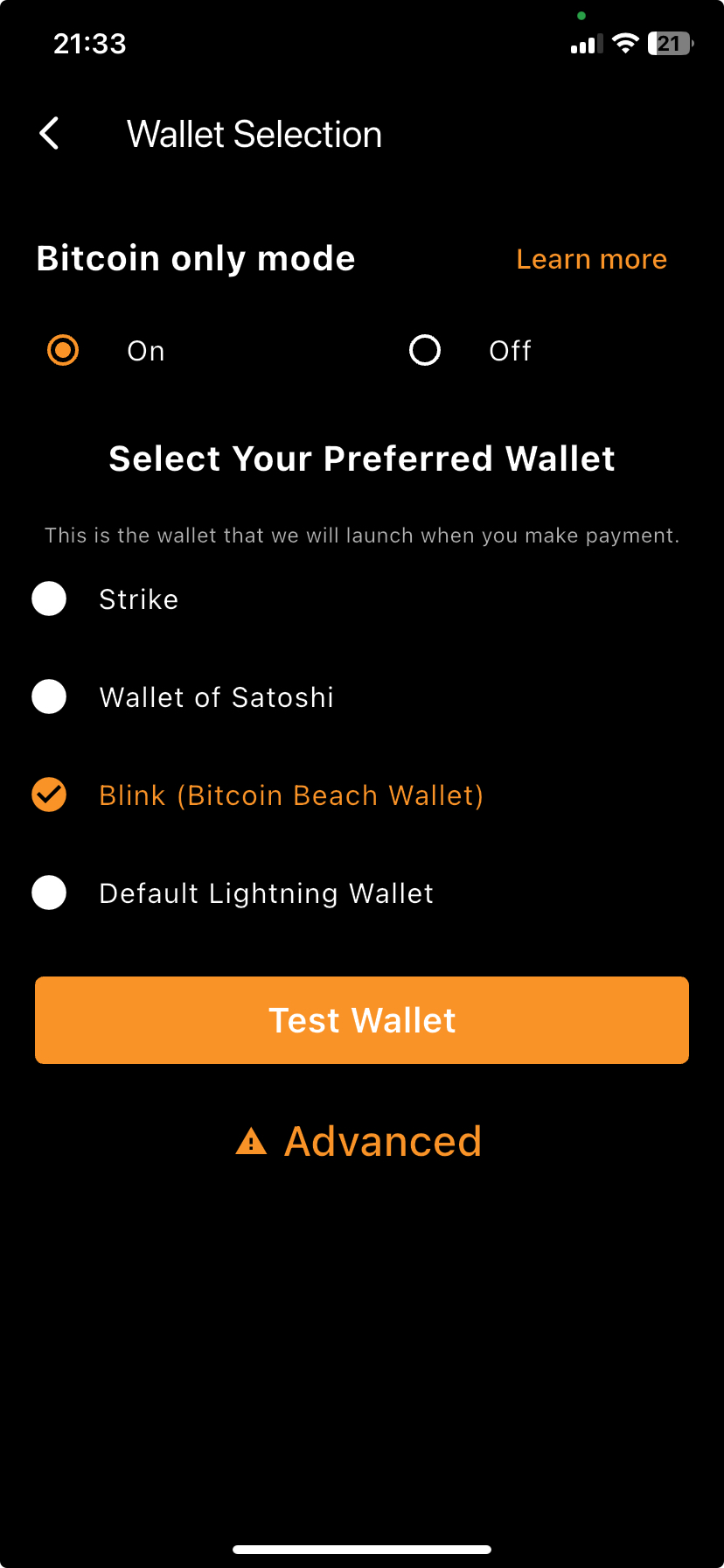
Note: Some Lightning wallets like Blink and Blitz already have MoneyBadger’s tech built in for certain stores like Pick n Pay, meaning you can sometimes pay with Bitcoin directly without even using MoneyBadger.
However, it may not work at all merchants where the MB tech is available, so we recommend that you stick to paying with MoneyBadger. It’s also faster because when you open the app, it immediately opens a scanner, and you don’t have to search for it like you would in a regular Lightning wallet.
Step 3: Get Bitcoin and fund your Lightning wallet
With your wallet and bridge ready, it’s time to get your hands on some sats (small units of Bitcoin) and then fund your wallet.
If you already have some BTC, skip ahead to learn how to fund your wallet. Otherwise, keep reading.
How to get Bitcoin locally
There are several ways to get your hands on some Bitcoin:
1. Local crypto exchanges: The simplest way to acquire Bitcoin is to buy it from a reputable South African exchange. You’ll need to complete a KYC verification, link your bank account, deposit rands, and buy Bitcoin.
(Note: In the long term, you’ll want to store your Bitcoin in cold storage to protect it from hacks and the risk of losing your coins if the exchange goes bankrupt.)
Popular options include Luno, VALR, Binance, and CapeCrypto.
- Luno and VALR are two of the largest in SA and have easy-to-use apps where you can deposit rands (via EFT or card) and buy Bitcoin.
- Binance is a global exchange that also operates in SA and supports Lightning withdrawals.
- CapeCrypto is a Cape Town-based exchange designed specifically with Lightning in mind. Like Binance, it allows you to withdraw Bitcoin directly over the Lightning Network.
2. Peer-to-Peer and other methods: You can also buy Bitcoin directly from someone via local Bitcoin groups or earn it by accepting it as payment for products or services.
The catch?
Both take time. Getting paid requires completing a job or selling a product first, and buying peer-to-peer depends on finding a willing seller. This isn't exactly ideal if you’re new to the space and just want to start spending Bitcoin in-store today. Still, over the long term, earning Bitcoin is one of the best ways to build your holdings.
How to fund your Lightning Wallet
If you received Bitcoin for your work or purchased it peer-to-peer, it may have been sent directly to your Lightning wallet.
If not, you can easily move it there. Most wallets can receive both on-chain and Lightning payments. On-chain payments require a few confirmations, whereas Lightning payments arrive instantly with minimal fees.
If your Bitcoin’s still on an exchange, the same two methods apply: on-chain or Lightning. Here’s how each one works in practice.
Option 1: On-chain transfer
Exchanges like VALR and Luno still only use the original Bitcoin network for withdrawals, which is known as on-chain transactions. It’s secure but slower and comes with slightly higher fees. If your exchange doesn’t support Lightning yet, you’ll simply:
- Open your Lightning wallet
- Tap Receive → On-chain deposit to get your Bitcoin address.
- Copy that address and paste it into your exchange’s withdrawal form.
- Send your BTC.
Here’s what that looks like in Blink:
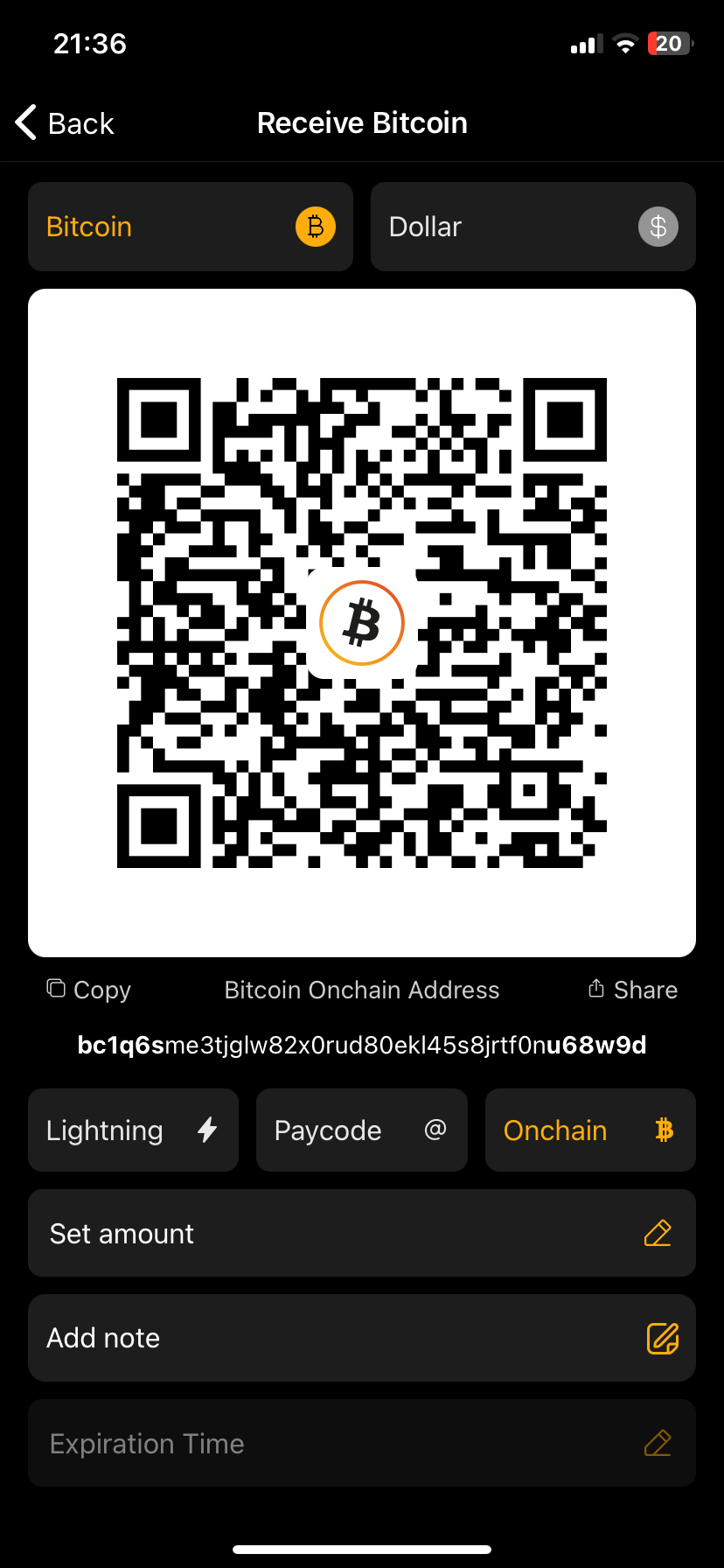
The transfer usually takes 10–30 minutes to confirm on the blockchain. Once complete, your wallet will reflect the funds in your Lightning balance (either automatically or after a quick “swap” step, depending on the app). You’re then ready to start paying with Bitcoin.
Option 2: Lightning transfer (if your exchange supports it)
This method is faster and more cost-effective, as it has shorter confirmation times and minimal fees. Currently, Binance and CapeCrypto both support Lightning Network withdrawals.
- On Binance, when withdrawing, select “Bitcoin Lightning” as the network and paste an invoice code from your wallet. The BTC will arrive in seconds.
- On CapeCrypto, you can do the same directly: withdraw to your Lightning wallet by pasting a Lightning invoice or QR code generated in your Lightning wallet. For a complete walkthrough, check out our Academy article: How to Get Bitcoin on Lightning with CapeCrypto.
Pro Tip: If you plan to move smaller amounts often, check the fees. Some wallets charge a small on-chain-to-Lightning conversion fee. Blink, for instance, charges around 5,000 sats (roughly R95 at a Bitcoin price of 1.9 mil) for small top-ups (under 1,000,000 sats), and Wallet of Satoshi takes approximately 1.95%.
Step 4: Scan the QR code with MoneyBadger and pay with Bitcoin
So you’ve got your Lightning wallet, connected it to MoneyBadger, and have some sats loaded. Now comes the fun part: actually spending it.
When you’re ready to pay with Bitcoin in store:
- Tell the teller or server you’d like to pay with Bitcoin and request the QR code payment option. Some may know this as “Scan to pay”, “Contactless QR,” or “Zapper.”
- Open the MoneyBadger App (the camera will load immediately).
- Scan the store’s QR code.
- Your Lightning wallet will open. Confirm the Bitcoin payment in your wallet.
And that’s it: you’ve made a real-world payment with Bitcoin.
Real examples: Bitcoin payments in South Africa
Here are examples of people paying with Bitcoin in SA:
1. How to pay with Bitcoin at Bootlegger in Cape Town using MoneyBadger and Blink
Here’s Roman showing us how to pay with Bitcoin at Bootlegger using MoneyBadger and Blink.
2. How to spend Bitcoin at Bootlegger in Gardens (CPT) using Luno Pay
Here’s Nick showing us how to buy a coffee at Bootlegger using Luno Pay:
3. How to pay with Bitcoin at Pick n Pay in Pretoria using CryptoQR
Here’s Paco showing us how to buy groceries using Bitcoin at a Pick n Pay in Pretoria.
Paco is using CryptoQR, the original app developed by MoneyBadger, to pilot Bitcoin payments at Pick n Pay. While the newer MoneyBadger has since been released, CryptoQR still works.
4. How to pay with Bitcoin at Locale in Claremont using the Zapper QR code
Here is Luvo showing us how he paid with Bitcoin at Starlings Locale by scanning a Zapper code with MoneyBadger and completing payment in Blink.
Frequently asked questions about how to pay with Bitcoin in South Africa
1. Is Bitcoin legal tender in South Africa?
No. Bitcoin isn’t legal tender, but it’s completely legal to own and use. Businesses can also choose to accept Bitcoin if they want to; they’re just not obliged to.
The rand (ZAR) is the only official legal tender in South Africa, meaning it must be accepted if offered to settle a debt.
2. Is it legal to pay with Bitcoin in South Africa?
Yes. It’s legal to own and spend Bitcoin in South Africa, though it’s not classified as legal tender like the rand.
3. Where can I actually use my Bitcoin today in South Africa?
You can already pay with Bitcoin at hundreds of thousands of locations nationwide:
- Pick n Pay accepts Bitcoin payments nationally via MoneyBadger.
- The Zapper network (~31k+ merchants) supports Bitcoin (and other cryptocurrency payments) via a partnership with Luno and MoneyBadger.
- Scan to Pay has enabled Bitcoin payments across ~650k merchant locations through its MoneyBadger partnership.
- For city-specific guides and verified merchants, explore:
You’ll also find these and other listings on BitcoinFriendlySA: your local platform to spending and accepting Bitcoin in South Africa.
4. Do I always need the MoneyBadger app to make a Bitcoin payment?
No. Some wallets, like Blink and Blitz, already have MoneyBadger’s tech built in for certain stores, like Pick n Pay, so that you can pay directly from your Lightning wallet.
You can pay directly using Luno, VALR, or Binance at Bootlegger, Zapper, or Pick n Pay Stores, as well as Luno and VALR at Scan to Pay-enabled merchants.
Still, the MoneyBadger app remains the most reliable way to pay anywhere. Just open it, scan the QR code, and confirm the payment in your Lightning wallet.
5. Which Lightning wallets work best for in-store Bitcoin payments in South Africa?
Most Lightning wallets will work, but some of the most popular ones for in-store Bitcoin payments in South Africa include:
- Blink
- Wallet of Satoshi
- Phoenix.
- Aqua
You can read our full wallet comparison in 8 top wallets for Iin-store spending in South Africa.
6. My exchange doesn’t support Lightning withdrawals: How do I fund my wallet?
You have two options:
- Withdraw on-chain to your Lightning wallet and let it handle the conversion
- Transfer to an exchange that supports Lightning withdrawals like CapeCrypto or Binance and withdraw directly over the Lightning Network.
Or skip exchanges entirely and:
- Receive Bitcoin payments directly to your wallet for services.
- Buy from someone peer-to-peer.
Tip: Ensure you fully understand all the fees involved. For example, Blink charges a 5,000 Sats fee for any on-chain payment below 1,000,000 Sats.
7. What if my Bitcoin payment fails at the till?
Try these quick fixes:
- Ask the cashier to refresh the QR code (it may have expired).
- Ensure your mobile data is enabled.
- Rescan, as sometimes it just needs a second try.
8. Can I use my exchange app at the till to pay with Bitcoin?
Yes. You can also scan and pay directly using Luno, VALR, or Binance at Bootlegger, Zapper, or Pick n Pay Stores, as well as Luno and VALR at Scan to Pay-enabled merchants.
9. Is Bitcoin adoption actually growing in SA, or is this just hype?
Adoption is real.
Grassroots communities, such as Bitcoin Ekasi in Mossel Bay and Bitcoin Witsand, are building local Bitcoin circular economies: places where people earn, save, and spend Bitcoin in their daily lives.
At the same time, Pick n Pay has been accepting Bitcoin for years through MoneyBadger, and Bootlegger recently joined them.
MoneyBadger has also partnered with major payment platforms, Zapper and Scan to Pay, to bring Bitcoin payments to hundreds of thousands of retail locations across South Africa, including Engen, Spur, Wimpy, and Clicks.
Together, these efforts show how Bitcoin is quietly becoming part of everyday South African life.
Start spending your Bitcoin today
By now, you should have everything you need to pay with Bitcoin in South Africa: a Lightning wallet, the MoneyBadger app, and a few sats ready to spend.
Our recommendation is to start small: Buy a coffee at Bootlegger, grab a snack at Engen, or pay for a few essentials at Pick n Pay. Once that first payment goes through, you quickly realise that Bitcoin is not just some speculative asset or an investment but sound money you can now spend across South Africa.
And every time you choose to pay with Bitcoin, you’re doing more than just making a transaction; you’re helping to strengthen the local circular economy and showing merchants that there's real demand for Bitcoin payments.
P.S. If you’d like to support my work, you can donate directly using the Bitcoin Lightning button below or send sats to nickdarlington@blink.sv from any Lightning wallet.

Stay updated on real-world Bitcoin adoption
Get the latest news, tips and updates on where to spend your Bitcoin and how to accept it at your business.

